Xelqavion

Understanding Accessibility Options in Modern Video Games
Video games have grown into sprawling, complex experiences over the past few decades, pushing the boundaries of storytelling and visual fidelity. Yet this rapid growth has often left behind players with specific sensory, motor, or cognitive needs. A gorgeous interface means little if the text is too small to read or the color palette blends interactive objects straight into the background.
Fortunately, developers at studios large and small have begun treating accessibility not as an afterthought, but as a core pillar of design. These features transform software from an exclusive club into an open medium. Understanding how these tools function helps players find titles that match their abilities and lets developers know which features matter most.
The Evolution of Subtitles and Audio Cues
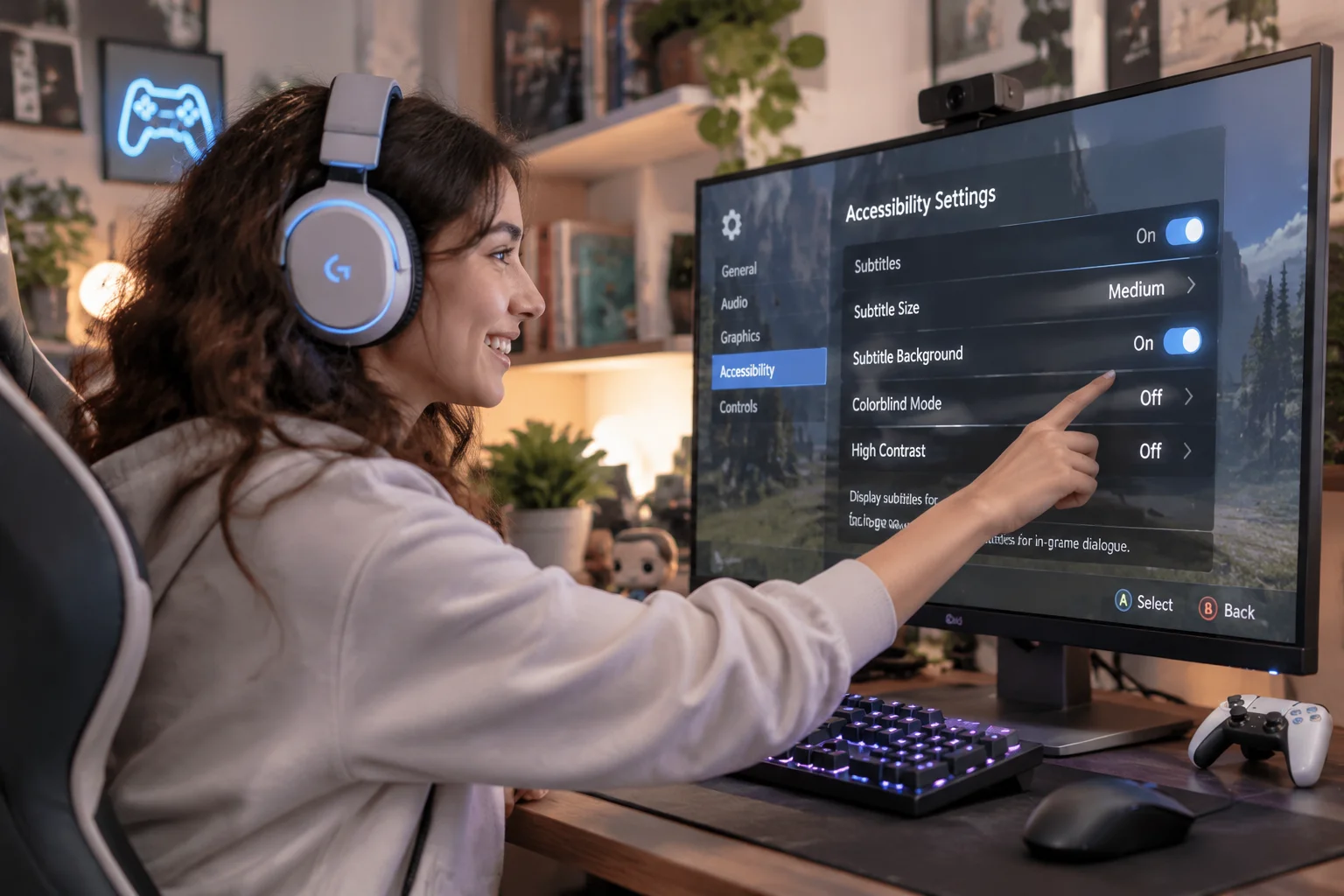
Sound design carries immense weight in interactive media, building atmosphere and delivering vital gameplay warnings. Players with hearing impairments miss out entirely on these cues unless developers provide robust visual alternatives. Modern subtitle systems have moved far beyond tiny white text at the bottom of the screen, offering speaker names, color coding, and directional arrows to indicate where a sound originates.
Visual indicators for off-screen threats bridge the gap between audio design and visual feedback. These additions ensure that tension remains intact without relying purely on hearing. When subtitles convey emotional delivery through font weight and size, the narrative impact reaches every participant equally.
- Speaker identification tags
- Adjustable background opacity
- Customizable font sizes
- Directional audio indicators
- Sound effect descriptions
Navigating Colorblindness and Visual Clarity
Color is frequently used to convey status, danger, or alliance in fast-paced software environments. Deuteranopia, protanopia, and tritanopia affect millions of players, turning crucial color-coded interfaces into muddy, indistinguishable messes. Dedicated colorblind modes shift palettes dynamically, substituting problematic hues with high-contrast alternatives that preserve the intended aesthetic.
Beyond specific color filters, modern interfaces increasingly offer HUD scaling and clutter reduction toggles. Reducing visual noise lets players focus on the core action instead of scanning a crowded screen for vital status bars. Clarity beats complexity every single time when split-second decisions dictate survival.
Reinventing Control Schemes for Every Hand
Standard gamepads are built for an average set of hands and mobility levels, completely ignoring individuals with repetitive strain injuries, limb differences, or missing digits. Full button remapping is the bare minimum requirement for modern releases, allowing participants to assign any action to any input. Advanced setups support hardware switches, eye-tracking devices, and adaptive controllers.
Toggle options for button mashing sequences save joints from unnecessary strain. Holding a button down instead of tapping it rapidly removes a frequent physical barrier without altering the challenge of the virtual encounter. Software should test mental acuity and reflexes, not cause physical pain.
Balancing Challenge Through Difficulty Settings
Difficulty has historically been tied to rigid tiers like easy, medium, or hard, forcing players into boxes that rarely fit their actual skill level. Granular difficulty sliders dismantle this outdated approach by letting individuals tweak enemy damage, resource abundance, game speed, and puzzle hints independently.
Adjustable challenge empowers newcomers and veterans alike to curate an experience that satisfies their personal goals. Frustration gives way to immersion when failure stems from tactical miscalculation rather than unforgiving numerical tuning. Accessibility ultimately ensures that virtual worlds remain places of enjoyment for everyone who steps inside them.
Four core options analysed
2463Over fifty titles reviewed
27669Countless barriers removed daily
1817

You can use our services by writing to us or calling us. We will be happy to answer any questions and help you order services!